XCIPTV Download Code: The Honest Firestick Guide
Published · Updated
Last month, a reader in Manchester contacted us after installing an app on his Firestick using a five-digit XCIPTV download code he had found in a YouTube comment. The code worked, but the file it opened was not what he expected. Within two days, the device began restarting without warning and displaying pop-ups over the Fire TV home screen.
The problem was not that the Downloader code failed. The problem was that it successfully directed him to an unverified file.
This guide explains the safer way to install XCIPTV Player on an Amazon Fire TV Stick. You will learn what a Downloader code actually does, how to avoid relying on random or outdated codes, how to recognise warning signs of a modified APK, and what UK viewers should understand about the legal use of IPTV players and streaming services.
The aim is simple: clear installation guidance, safer download practices, and no dependence on unverified codes or exaggerated claims.
What an XCIPTV Downloader Code Actually Is
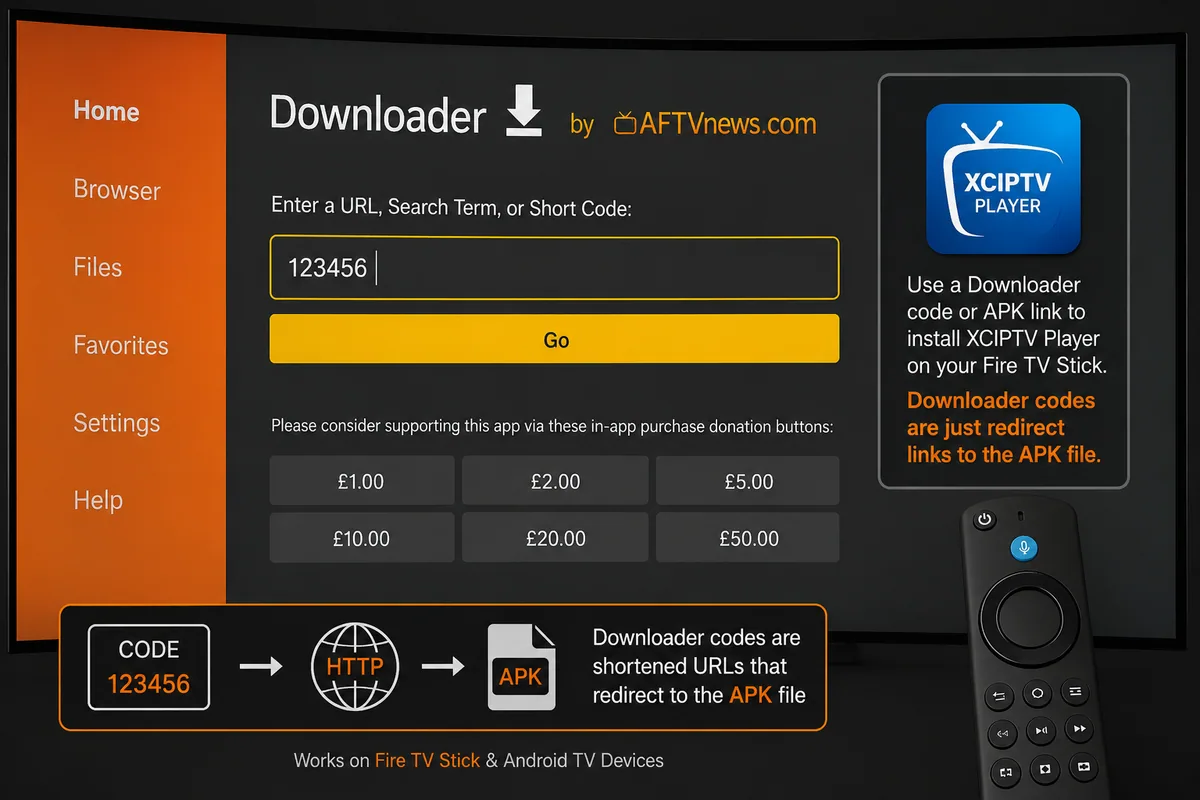
A Downloader code is not an official app identifier or a security feature. It is simply a shortcut that redirects the Downloader app to a particular web address.
Downloader, developed by AFTVnews, can open shortened links represented by numeric codes. Someone creates a code that points to an APK file or download page, shares the number, and the user enters it into Downloader. The app then opens whatever file or page is linked to that code.
This leads to three important considerations:
- Codes can expire. If the hosted file is removed or the destination changes, the code may stop working.
- Anyone can create one. A Downloader code is not automatically reviewed, verified, or approved before being shared.
- The code does not identify the file. Two similar-looking codes can lead to completely different APK files, including outdated, modified, or potentially unsafe versions.
For this reason, the safety of an XCIPTV download code depends on the source behind it rather than the number itself.
💡 Expert Insight: A five-digit code tells you very little about the file you are about to install. What matters is who hosts the APK, whether the source can be verified, and whether the file comes from the genuine developer or another reputable distributor.
What XCIPTV Player Actually Does — and What It Does Not
XCIPTV Player is a media-player application developed by OTTRUN. According to the information supplied for the current version, it supports Android-based devices and can be used on compatible Fire TV hardware.
The player includes multiple playback options and supports common IPTV formats and features. Depending on the version and connected source, these may include:
- ExoPlayer and VLC-based playback
- Adaptive HLS streaming
- Electronic Programme Guide support
- Xtream Codes-compatible logins
- M3U URL support
- Catch-up television
- Video-on-demand categories
- Series organised by seasons and episodes
- Favourite channels
- Backup and restore
- Multi-device functionality
- Scheduled recording where supported
- Internal or external storage options
What XCIPTV Player does not provide is equally important.
The application does not supply television channels, films, sporting events, or subscription content of its own. Users must connect their own authorised media source or service credentials.
In practical terms, XCIPTV is the player interface. The content displayed inside it depends entirely on the source you connect.
How to Install XCIPTV on Firestick Using Downloader
If XCIPTV is not available through an official store on your device, Downloader can be used to install a verified APK manually.
Step 1: Allow Installation From Unknown Apps
Open:
Settings → My Fire TV → Developer Options
If Developer Options is not visible, go to:
My Fire TV → About
Highlight your Fire TV device name and press the select button seven times. Return to the previous menu and open Developer Options.
Next, open Install Unknown Apps and enable permission specifically for Downloader.
Only enable this permission for the application performing the installation, and disable it again when you are finished.
Step 2: Install Downloader
Search the Amazon Appstore for Downloader and install the official application.
Downloader itself should be obtained directly from the Amazon Appstore rather than from another APK website or an undocumented installation code.
Step 3: Download XCIPTV From a Verified Source
Instead of relying on a random XCIPTV download code, use Downloader’s browser to visit a source you can verify.
Prefer the official XCIPTV or OTTRUN source where available. If you use a third-party APK repository, check the publisher information, app version, digital signature, and reputation of the download source before installing anything.
Do not assume that an APK is genuine simply because the filename says “XCIPTV.”
Once you have verified the file:
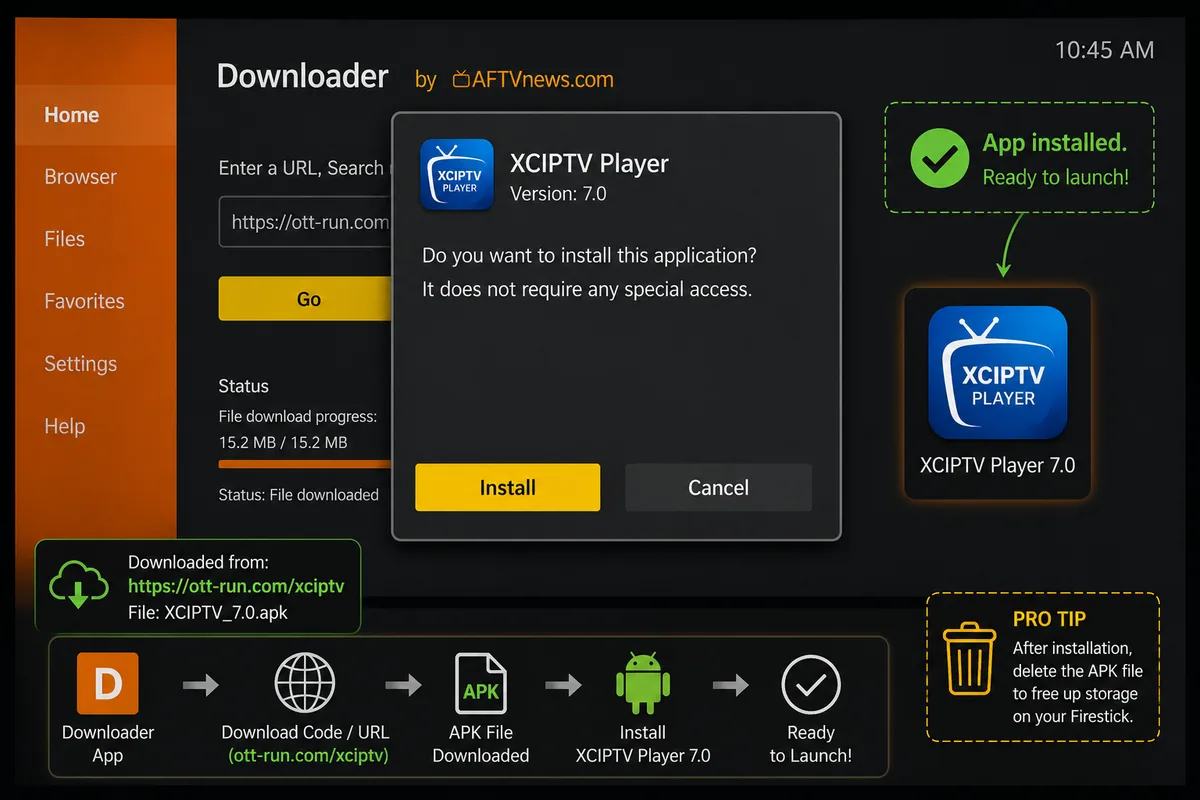
- Download the APK.
- Select Install when Fire TV displays the installation prompt.
- Wait for installation to complete.
- Select Done.
- Delete the APK installation file from Downloader to recover storage space.
Step 4: Add Your Authorised Service
Open XCIPTV after installation.
Depending on the app version, you may be able to connect using:
- Xtream Codes-compatible credentials
- Server URL, username, and password
- An M3U playlist URL
Enter the details exactly as supplied by your authorised service provider.
Programme-guide information and channel categories may take a short time to populate after the first successful login.
💡 Pro Tip: If your first login attempt fails, restart the Firestick before repeatedly changing account details. Then check the username, password, server address, and connection status carefully before trying again.
Downloader Codes for Firestick: The Security Risk
The main concern with undocumented Downloader codes is not the numeric code itself. The risk comes from the APK file or website sitting behind that shortcut.
Modified versions of popular IPTV players can be repackaged with unwanted or malicious software. Potential risks may include:
- Aggressive advertising or pop-ups
- Credential theft
- Unnecessary background processes
- Excessive device permissions
- Tracking components
- Redirects to unrelated services
- Software that becomes difficult to remove
This is why the source of an XCIPTV download code should always be checked before installation.
An anonymous code posted in a forum, social-media comment, or video description provides little assurance about who created the APK or whether it has been modified since the original release.
UK anti-piracy and cybersecurity organisations have also warned about the wider security risks associated with unverified and illegal streaming setups, including exposure to malware, fraud, and personal-data theft.
The safer approach is straightforward: use genuine software, verify the publisher and download source, review permissions, and connect only to media services you are authorised to access.
Quick sanity check before you install anything:
| Signal | Trustworthy | Walk away |
| Source | Developer site, APKMirror, Uptodown | Anonymous file host, Telegram link |
| Signature | Verified, matches official build | Unknown or “modded” |
| Version | 7.0, matching the official changelog | “Premium unlocked”, “no ads mod” |
| File size | ~34–40 MB | Wildly larger or smaller |
| Permissions | Storage, network | SMS, contacts, accessibility services |
xciptv download code Anything promising “unlocked” or “premium” features in a free app is repackaged by definition. Someone modified it. You don’t know what else they modified.
IPTV and the Law in the UK
UK viewers should understand the legal distinction between IPTV technology, media-player apps, and unauthorised content services.
Using an IPTV player is legal. Sideloading an application onto a compatible device is also legal. Subscribing to a provider that has the necessary rights to distribute its content is lawful.
The legal problem arises when a service provides access to premium television, such as Sky Sports, TNT Sports, or Premier League broadcasts, without obtaining the required distribution rights.
UK enforcement against illegal IPTV operations has increased considerably. FACT, police forces, broadcasters, and other enforcement bodies have carried out coordinated investigations targeting services that distribute or sell unauthorised television subscriptions.
June 2026
In June 2026, Michael Barrow, who operated the “MB Streams” service, received a prison sentence of three years and two months at Swansea Crown Court after pleading guilty. The following month, Merseyside Police arrested four men during an investigation involving multiple search warrants connected with suspected illegal IPTV supply.
Broadcasters have also taken action against online listings promoting unauthorised subscriptions and preconfigured or “loaded” streaming devices.
Enforcement activity has generally focused more heavily on operators, resellers, and people supplying illegal services than on individual viewers. However, UK law can also apply to people who knowingly receive paid broadcasts while deliberately avoiding the required payment.
This means an XCIPTV download code or media-player application does not determine whether a setup is lawful. What matters is whether the content being accessed is properly licensed and whether the user has permission to view it.
Research Report 2026
Research also suggests that public attitudes towards illegal streaming do not always reflect the legal position. The Sport Industry Report 2026 found that a significant proportion of regular viewers considered illegal streaming acceptable, highlighting a gap between social attitudes and copyright law.
💡 Expert Insight: The practical risks extend beyond legal enforcement. Unauthorised services may disappear without notice, offer little or no refund protection, expose payment information to anonymous sellers, or require users to install unverified software. A licensed provider can work with compatible players such as XCIPTV while offering clearer billing, support, and content rights.
Final Thoughts
There are three main points to remember.
First, a Downloader code is only as trustworthy as the file behind it. Always verify the source rather than relying on the number alone.
Second, XCIPTV is a capable media player, but it does not include channels or premium content. You must connect your own authorised playlist or service credentials before it can display anything.
Finally, in the UK, the legal position depends primarily on the content source and whether the provider has the necessary rights to distribute it. The XCIPTV application itself does not determine whether a particular stream is lawful.
If you have installed XCIPTV successfully or encountered a problem not covered in this guide, leave a comment. We regularly review our instructions as XCIPTV builds, Fire OS menus, and Firestick firmware change.
Once the setup is configured correctly, XCIPTV can provide a straightforward and reliable way to organise authorised streaming content.
Frequently Asked Questions
What Is the XCIPTV Downloader Code for Firestick?
There is no single official XCIPTV Downloader code.
Downloader codes are user-created shortcuts that redirect to hosted APK files or download pages. They can stop working when the original file is removed, the destination changes, or the link expires.
Instead of searching for another random code, use Downloader’s browser to obtain XCIPTV from the developer’s official source or another reputable source that verifies application signatures. This approach is generally more reliable and provides greater confidence about the file being installed.
Is XCIPTV Free to Download?
XCIPTV Player is generally available as a free media-player application, although availability, file size, and requirements can vary between versions.
Some IPTV providers distribute customised or branded editions with their own licensing arrangements. Avoid modified or “premium unlocked” APK files from unknown sources, as these may have been altered from the original application.
Does XCIPTV Include Channels?
No. XCIPTV does not provide television channels, films, sporting events, or subscription content.
It functions as a media player and connects to supported sources such as Xtream Codes-compatible credentials or an M3U playlist supplied by the user.
The content available inside the application therefore depends entirely on the authorised source you connect.
Is Using XCIPTV Legal in the UK?
Using XCIPTV as a media player can be legal, and sideloading a legitimate application onto a compatible device is not automatically unlawful.
The legal issue depends on the content source. A properly licensed service can be used lawfully, while a provider distributing premium television or copyrighted content without the necessary rights may be operating illegally.
The player itself does not make an unauthorised stream lawful.
Why Has My XCIPTV Downloader Code Stopped Working?
A Downloader code may stop working because the hosted APK was removed, the destination URL changed, or the shortcut expired.
Some links may also disappear after the hosting provider removes the file.
Rather than repeatedly searching for replacement codes, visit a verified source directly. This reduces the risk of installing an outdated, modified, or unrelated APK.
About the Author
Zeeshan Shafiq is a streaming technology writer and Fire TV specialist with more than 7 years of hands-on experience testing IPTV players, Fire TV devices, and Android-based streaming hardware.
He has helped UK viewers understand device setup, media-player configuration, troubleshooting, and safer streaming practices, with a focus on clear installation guidance and responsible use of streaming technology.