Sky Glass IPTV: Complete UK Guide for 2026
Published · Updated
Sky Glass IPTV allows UK households to access live television, films, sports, and on-demand entertainment through an internet connection rather than relying on a traditional satellite dish. Sky Glass combines a 4K smart television, integrated speakers, and Sky’s streaming platform within a single entertainment system.
However, people searching for Sky Glass IPTV may have different intentions. Some are looking for information about the official Sky Glass television and its streaming features, while others want to know whether third-party IPTV applications or services can be used with the device.
This guide explains how Sky Glass works, which applications it supports, whether you can install an IPTV player, and what UK viewers should consider when evaluating their streaming options.
What Is Sky Glass IPTV?
Sky Glass is a smart television with Sky’s streaming technology built directly into the device. Instead of receiving television through a traditional satellite dish, it connects to your home broadband and delivers channels and on-demand content over the internet.
Because television content is transmitted using an internet connection, Sky Glass operates using IPTV-style delivery technology.
The Sky Glass system runs on Sky OS and brings together several entertainment features, including:
- Live Sky television channels
- On-demand programmes and films
- Supported streaming applications
- Personalised content recommendations
- Voice search
- The Sky Playlist feature
Sky describes Sky Glass as a 4K streaming television designed to work over broadband without requiring a satellite dish or separate Sky box.
How Does Sky Glass IPTV Work?
Sky Glass connects to your home broadband using either Wi-Fi or an Ethernet connection. Once online, the television streams live channels, on-demand programmes, and content from supported applications directly through the internet.
The basic setup process is straightforward:
- Connect Sky Glass to your home broadband.
- Sign in using your Sky account.
- Activate the required Sky television package.
- Sign in to any supported third-party streaming applications.
- Search for programmes using the remote control or built-in voice search.
Unlike a traditional Sky Q setup, the main Sky Glass service does not require a satellite dish, external receiver, or separate television box.
As a result, the quality of your viewing experience depends heavily on the speed, stability, and reliability of your broadband connection.ion.
Is Sky Glass the Same as a Normal IPTV App?
No. The official Sky Glass service and a third-party IPTV application are not the same.
Sky Glass is an integrated television and streaming platform operated by Sky. It runs on Sky OS and provides access to Sky content alongside applications that are supported or approved for the platform.
A standard IPTV player, by comparison, is usually an application installed on a compatible device such as an Android TV, Fire TV Stick, smartphone, tablet, or smart television. The app itself normally requires login credentials or a playlist supplied by a separate television service.
Some third-party providers use terms such as “Sky Glass IPTV app,” but this does not necessarily mean the application is developed, approved, or operated by Sky UK.
Before installing any IPTV application, check:
- Who developed and published the app
- Where the application is downloaded from
- Which device permissions it requests
- Whether the content provider is authorised to distribute its channels
- Whether the service clearly identifies its business and terms
Do not assume that an application is officially associated with Sky simply because its name, branding, or interface resembles Sky Glass.
Can You Install IPTV Apps on Sky Glass?
Sky Glass is not an open Android TV platform. Users do not have access to the Google Play Store and cannot freely install Android APK files directly onto the television.
Sky controls which applications are available through the Sky Glass Apps menu, meaning users are limited to the services supported by the platform.
As a result, you cannot normally install IPTV Smarters, TiviMate, XCIPTV, or similar Android IPTV players directly on Sky Glass.
This is an important distinction for anyone researching IPTV on Sky Glass, as the television does not offer the same level of app installation flexibility as an Android TV device or Fire TV Stick.
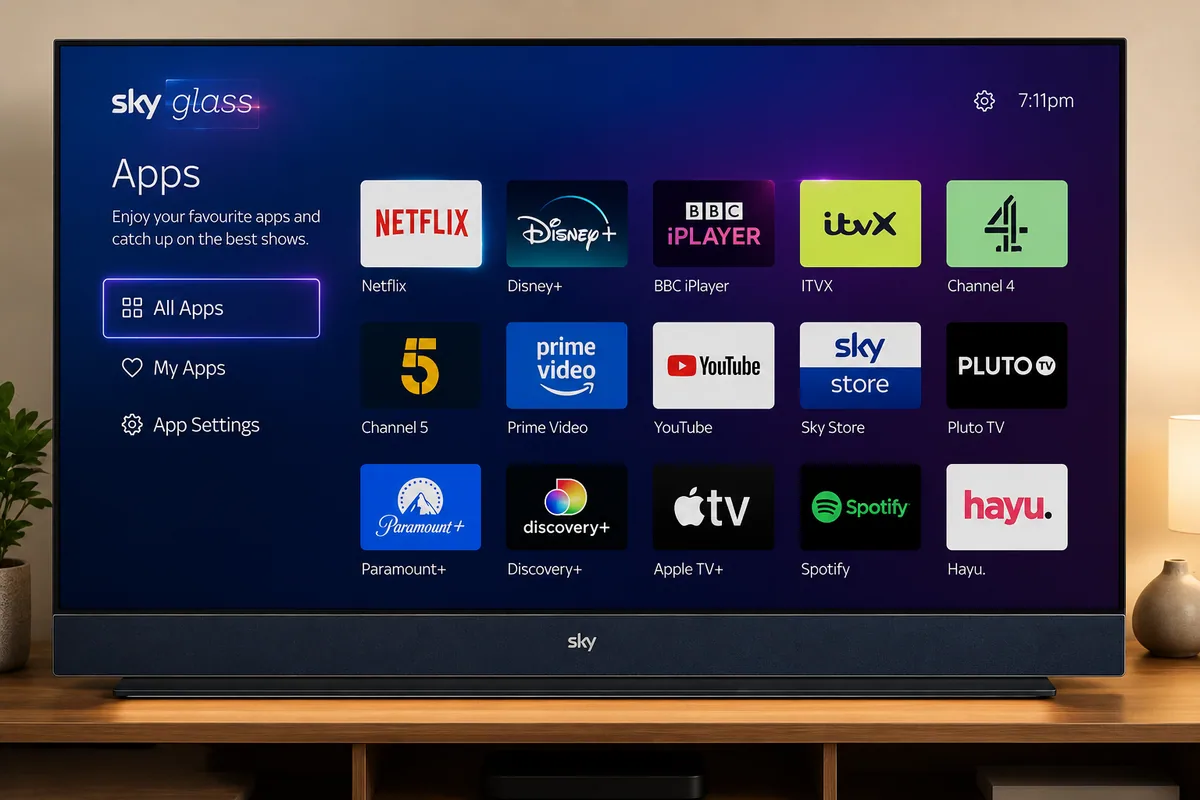
Which Apps Are Available on Sky Glass?
Sky Glass supports a range of established streaming, entertainment, and catch-up applications. The exact selection may change over time, but commonly supported services include:
- Netflix
- Disney+
- BBC iPlayer
- ITVX
- Channel 4
- Amazon Prime Video
- Apple TV+
- Paramount+
- Discovery+
- Hayu
Some applications or services may be included as part of a Sky package, while others require a separate subscription.
Users can normally access supported services through the Sky Glass Apps menu and sign in using their existing account details.
App availability, subscription requirements, and package inclusions can change, so it is advisable to check Sky’s latest service information before choosing or changing a subscription. Sky and the individual streaming platform before purchasing.
Can You Use a Firestick With Sky Glass?
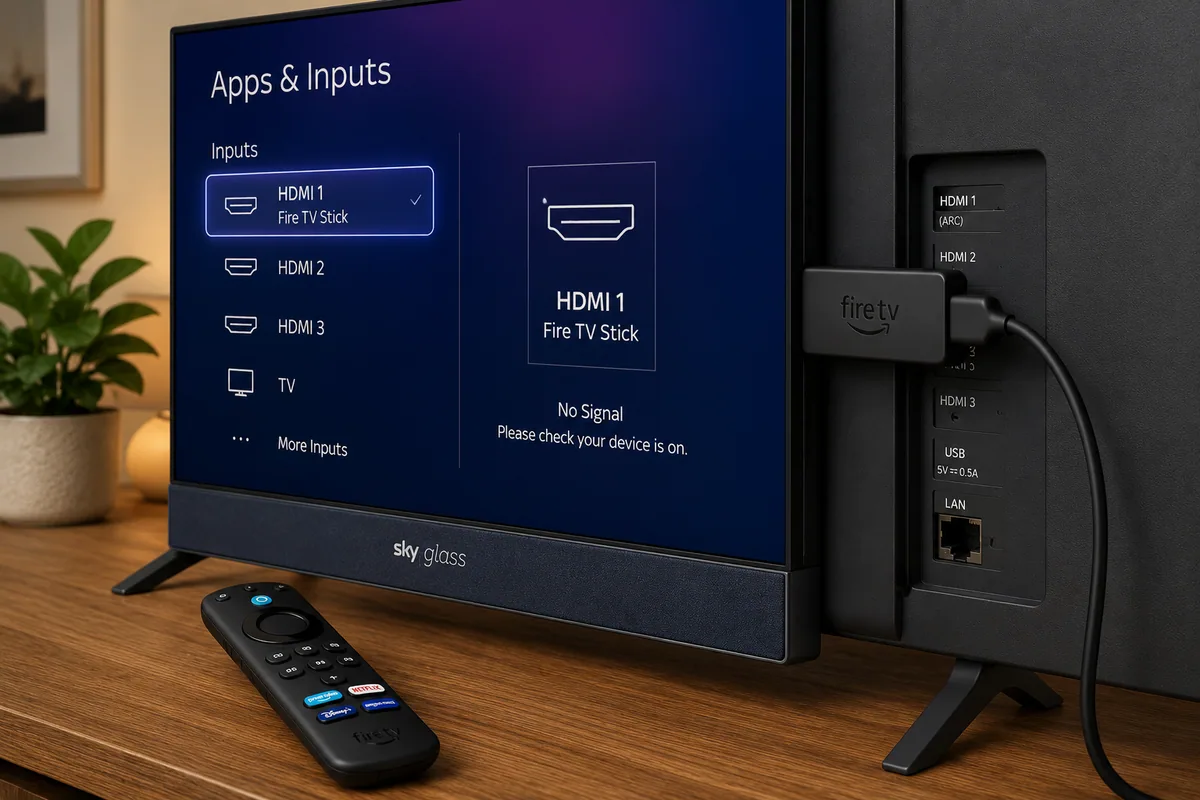
Yes. Sky Glass includes HDMI ports, allowing you to connect compatible external streaming and entertainment devices directly to the television.
You can use devices such as:
- Amazon Fire TV Stick
- Android TV box
- Apple TV
- Games console
- Compatible satellite or cable receiver
After connecting the device, open Apps and Inputs on Sky Glass and select the correct HDMI source.
Connecting a Firestick does not modify the Sky Glass operating system. The Firestick continues to run its own apps and interface independently, while the Sky Glass television simply provides the display and audio output.
Does Sky Glass Need a Satellite Dish?
No. Sky Glass delivers its television service over broadband, so a traditional satellite dish is not required.
This can make it particularly suitable for:
- Flats where satellite dishes are restricted
- Rented properties
- New-build developments with installation limitations
- Homes without an existing satellite connection
- Viewers who prefer an internet-based television setup
Sky Glass still requires a power connection, a reliable broadband service, and an active account for any paid Sky packages or supported streaming subscriptions you use.s.
What Broadband Speed Does Sky Glass Need?
A stable broadband connection is generally more important than achieving a single high result on a speed test.
Sky Glass streaming performance can be affected by several factors, including:
- The number of devices connected to your network
- The distance between the television and router
- Thick walls and wireless interference
- Peak-time broadband congestion
- Whether you are watching HD or 4K content
- Downloads, gaming, or other high-bandwidth activity in the home
For more reliable performance, position your router in an open and central location rather than inside a cabinet or behind furniture. If the television is close enough to the router, an Ethernet connection may provide a more consistent connection than Wi-Fi.
Households in London, Birmingham, Manchester, Glasgow, Cardiff, and other UK locations should also check broadband availability at their exact postcode. Local speeds and network quality can vary considerably, so national coverage figures may not accurately reflect the service available at a particular property.
Sky Glass IPTV Setup Tips
The official Sky Glass setup process is designed to be straightforward, but a few practical steps can help improve performance and usability.
Position the Television Carefully
Place Sky Glass where the screen is not exposed to excessive reflections or direct sunlight. Leave sufficient space around the television to allow proper ventilation and avoid blocking any vents.
Use a Reliable Internet Connection
Connect Sky Glass to the strongest and most stable Wi-Fi connection available. Where practical, use Ethernet for a more consistent wired connection.
Avoid placing the router behind large pieces of furniture, inside cabinets, or close to electronic equipment that may interfere with the wireless signal.
Update the System
Allow Sky Glass to download and install any available software updates during the initial setup.
Keeping the system updated can improve security, app compatibility, stability, and overall performance.
Sign In to Your Apps
Open the Apps menu and sign in to supported streaming services such as Netflix, Disney+, and Prime Video using your existing account credentials.
Remember that some applications require a separate paid subscription even when they are available through Sky Glass.
Set Up Parental Controls
Sky Glass provides parental controls that can help households manage access to age-restricted content and certain features.
Some third-party streaming applications also include their own parental control settings, which may need to be configured separately.
Test Live and On-Demand Content
After completing the setup, test several live channels and on-demand programmes to confirm that playback is smooth and the broadband connection remains stable.
If you notice buffering or interruptions, compare Wi-Fi and Ethernet performance, restart the router, and check whether other devices are using significant bandwidth at the same time.his will help identify whether buffering is caused by a particular application or the wider internet connection.
Common Sky Glass IPTV Problems
Buffering or Reduced Picture Quality
Buffering, lower picture quality, or temporary playback interruptions are often linked to an unstable broadband connection, weak Wi-Fi, network interference, or heavy internet usage elsewhere in the home.
Try the following troubleshooting steps:
- Restart your broadband router
- Restart the Sky Glass television
- Move the router closer to the television where possible
- Disconnect devices that are not currently in use
- Use an Ethernet connection for greater stability
- Check whether your broadband provider is reporting a local service issue
If the problem continues, test other streaming applications on Sky Glass. If several services are affected, the issue is more likely to be related to your home network or broadband connection rather than one individual app.
An App Is Missing
Sky controls which applications are available on Sky Glass. If an app does not appear in the Apps menu, users cannot normally install it manually.
If the service is legally available on another platform, such as Fire TV or Android TV, you may need to use a compatible external streaming device connected through HDMI.
An App Will Not Open
Restart the Sky Glass television and confirm that your internet connection is working correctly.
If the problem continues, sign out of the affected application and sign back in. You should also check whether the app or Sky Glass software requires an update.
Voice Search Does Not Find Content
Sky Glass voice search may not index every programme available through every third-party application.
If a title does not appear in Sky’s main search results, open the relevant streaming app and search for the programme directly.
The Television Is Offline
Check whether other devices in your home can connect to the same broadband network.
If none of them can access the internet, the issue is more likely to be related to your router or broadband provider rather than Sky Glass itself.
Is Sky Glass IPTV Legal in the UK?
IPTV technology itself is legal. Major services such as Sky, BBC iPlayer, ITVX, Netflix, and Amazon Prime Video all use internet-based streaming technology to deliver television and on-demand content.
The legal issue depends on whether the service provider has permission to distribute the channels, films, sporting events, and other programmes it offers.
Streaming devices can be used lawfully when they provide access to legitimate and properly licensed content. Problems arise when devices or services are used to access paid or copyrighted material without the necessary subscription, licence, or permission.
Be cautious when a service:
- Offers a very large selection of premium channels at an unusually low price
- Does not clearly identify the company operating the service
- Accepts only difficult-to-trace payment methods
- Provides no clear terms, privacy policy, or refund information
- Claims to include virtually every major sporting event worldwide
- Uses branding that closely resembles established broadcasters
- Cannot clearly explain its rights to distribute the content offered
Wherever possible, choose authorised services, use official application stores, and review the provider’s business information and terms before subscribing.ssible.
Advantages of Sky Glass IPTV
Sky Glass offers several practical advantages for UK households looking for an internet-based television setup.
No Satellite Dish Required
Sky Glass delivers television through broadband, removing the need for a traditional satellite dish installation.
All-in-One Entertainment System
The television, built-in speakers, Sky interface, and streaming platform are combined within a single product, reducing the need for separate equipment.
Easier Content Discovery
Voice search, personalised recommendations, and integrated search features can make it easier to find programmes across Sky and supported streaming applications.
Cleaner Installation
Because fewer external boxes and cables are required, Sky Glass can provide a simpler and more streamlined television setup.
Access to Popular Streaming Apps
A range of major streaming services can be accessed through the central Apps menu, although availability and subscription requirements vary between platforms.
Possible Disadvantages of Sky Glass IPTV
Sky Glass may not be the right choice for every household, particularly for users who want greater control over their devices and applications.
Dependence on Broadband
Because Sky Glass relies on an internet connection, broadband outages, weak Wi-Fi, or network instability can interrupt live television and on-demand streaming.
Limited App Installation
Sky Glass is not an open Android TV platform, so users cannot freely install every television, streaming, or media application they may want to use.
Ongoing Subscription Costs
Depending on the package selected, users may need to pay separately for the television, Sky services, and third-party streaming subscriptions.
Less Flexibility for Advanced Users
Users who want greater control over apps, storage, launchers, sideloading, and system settings may find an Android TV device or Amazon Fire TV product more flexible.
Sky Glass vs Firestick IPTV
Sky Glass and Firestick serve different purposes. Sky Glass is an integrated television and streaming system built around Sky’s own platform, while a Firestick is a separate streaming device designed to run compatible Fire TV applications.
Choose Sky Glass if you want:
- Sky television built directly into the screen
- No satellite dish installation
- A simple and managed user interface
- Integrated picture and sound
- Access to official Sky packages and supported streaming apps
Consider a Firestick or another external streaming device if you want:
- Access to a broader range of applications
- A portable streaming solution
- Greater control over installed apps
- An easy way to add smart features to an existing television
The two can also be used together. A Firestick can connect to a Sky Glass television through HDMI and operate independently using its own apps and interface.
Is Sky Glass IPTV Worth It?
Sky Glass IPTV can be a good option for households that want official Sky entertainment, popular streaming apps, and a smart television combined in one straightforward system.
It may be especially suitable for homes where installing a satellite dish is not practical or desirable.
However, Sky Glass may be less suitable for users who want to install Android APK files, access an unrestricted app store, or customise the operating system extensively. Sky Glass is a controlled platform, so only supported applications are available through its interface.
Before making a decision, compare:
- The total monthly cost
- The reliability of your broadband connection
- The channels and programmes you watch most often
- The streaming applications you regularly use
- The television size that suits your room
- Whether you plan to connect external streaming devices
Final Verdict
Sky Glass offers a convenient internet-based television experience for UK households that want Sky channels, major streaming applications, and smart-TV features without installing a satellite dish.
The main limitation is that Sky Glass IPTV operates as a managed platform rather than an open Android TV system. Users cannot freely install every third-party IPTV application directly onto the television. If a legitimate service is not available through Sky Glass, a compatible external streaming device connected through HDMI may provide greater flexibility.
Always use trusted applications and properly licensed television services. This can help protect your personal information, improve service reliability, and reduce the risk of paying for an unsupported or short-lived provider.
Frequently Asked Questions
What Does Sky Glass IPTV Mean?
Sky Glass IPTV generally refers to the way Sky Glass delivers live television and on-demand content through an internet connection rather than a satellite dish.
The term is also sometimes used online to describe unrelated third-party IPTV services or applications, so it is important to confirm which product or service is being discussed.
Can I Download an IPTV Player on Sky Glass?
Sky Glass does not provide an open app store for installing arbitrary Android IPTV players.
Users are limited to applications supported by the Sky Glass platform. If a particular service is unavailable, a compatible external streaming device may be required.
Can I Connect a Firestick to Sky Glass?
Yes. A Fire TV Stick can be connected to an available HDMI port on a Sky Glass television.
After connecting the device, open Apps and Inputs and select the appropriate HDMI source. The Firestick then operates independently using its own interface and applications.
Is Sky Glass an Android TV?
No. Sky Glass runs Sky OS rather than the standard Android TV operating system.
This means app availability and system customisation are controlled differently from Android-based televisions and streaming devices.
Does Sky Glass Work Without the Internet?
Most Sky Glass television and streaming features depend on an active internet connection.
External devices connected through HDMI may still function without Sky Glass being online, although their operation will depend on the individual device and the service being used.
Do I Need a Satellite Dish for Sky Glass?
No. Sky Glass delivers its main television service through broadband and does not require a traditional satellite dish.
This is one of its main differences from older Sky television setups.
Is Every IPTV Subscription Legal in the UK?
No. IPTV technology itself is legal, but a service provider must have the necessary rights or permission to distribute the television channels, films, sporting events, and other content it offers.
Avoid providers that offer unauthorised premium content or cannot clearly explain their business identity, terms, or content rights.
For readers who want more detailed information about the platform, our sister site Sky Glass IPTV provides additional guides focused specifically on Sky Glass.
Related guides: Best IPTV apps for Firestick | Installing IPTV on Firestick | Downloader codes | Choosing an IPTV subscription | IPTV troubleshooting | Our DMCA policy
About the Author
This guide is published by the IPTV Firestick 4K Editorial Team. We produce practical guides covering Amazon Fire TV devices, streaming applications, IPTV players, and media setup.
Our content is reviewed and updated when Fire OS menus, app availability, device compatibility, or platform features change.
IPTV Firestick 4K also offers IPTV subscription services alongside its editorial content. We do not own or control the individual television channels made available through third-party content sources. Learn more about who we are and how we test.