IPTV Smarters Downloader Code 6468112: Working Firestick Code
Published · Updated
The current IPTV Smarters Downloader Code is 6468112.
Enter the code in the Downloader app on your Amazon Firestick or compatible Android TV device. It currently directs users to the IPTV Smarters Pro 5.0 APK.
| Code information | Current status |
| Downloader code | 6468112 |
| Status | Working when last checked |
| Application | IPTV Smarters Pro 5.0 |
| Final domain | iptvsmarters.com |
| Last verified | 30 July 2026 |
| Includes channels | No |
| Includes login details | No |
The current Downloader code 6468112 redirects through the AFTVnews URL Shortener to an APK hosted on the IPTV Smarters domain.
Because Downloader codes are simply shortcuts to web addresses, their destinations can change over time. Always check the final website address before downloading or installing any APK file.
Important: Code 6468112 installs an IPTV media-player application only. It does not provide live TV channels, films, an IPTV subscription, an M3U playlist, or account login details such as a username and password.
You will need to connect your own authorised IPTV service, playlist, or media source after installing the player.
What Is the IPTV Smarters Downloader Code?
An IPTV Smarters Downloader Code is a short numerical code that can be entered into the Downloader app on a Firestick or compatible Fire TV device.
Normally, installing an APK may require users to type a full web address using the Firestick remote. A Downloader code makes this easier by opening a saved destination through a short number.
The code itself is not an app, IPTV subscription, login credential, or activation key. It simply redirects Downloader to a webpage or APK installation file.
Code 6468112 can therefore be described as:
- A shortcut used inside the Downloader app
- A quick way to reach an IPTV Smarters APK
- An easier alternative to typing a long download address
- A redirect that should always be checked before downloading
Do not confuse the Downloader code with an IPTV service username, password, subscription, or Premium activation code.
Is 6468112 an Official IPTV Smarters Code?
Code 6468112 works through the AFTVnews URL Shortener used by the Downloader application. At the time of verification, it redirects to an IPTV Smarters APK hosted on the IPTV Smarters domain.
However, this does not necessarily mean the code is permanently issued, maintained, or guaranteed by the IPTV Smarters developer.
Downloader codes can stop working, be deleted, or have their destination changed over time.
For this reason, it is useful to check:
- The Downloader code itself
- The final destination URL
- The application version shown in the APK filename
- The date the destination was last verified
Always check the final download destination before installing an APK. Do not trust a Downloader code simply because it appears in a blog post, YouTube video, forum, or social-media comment.
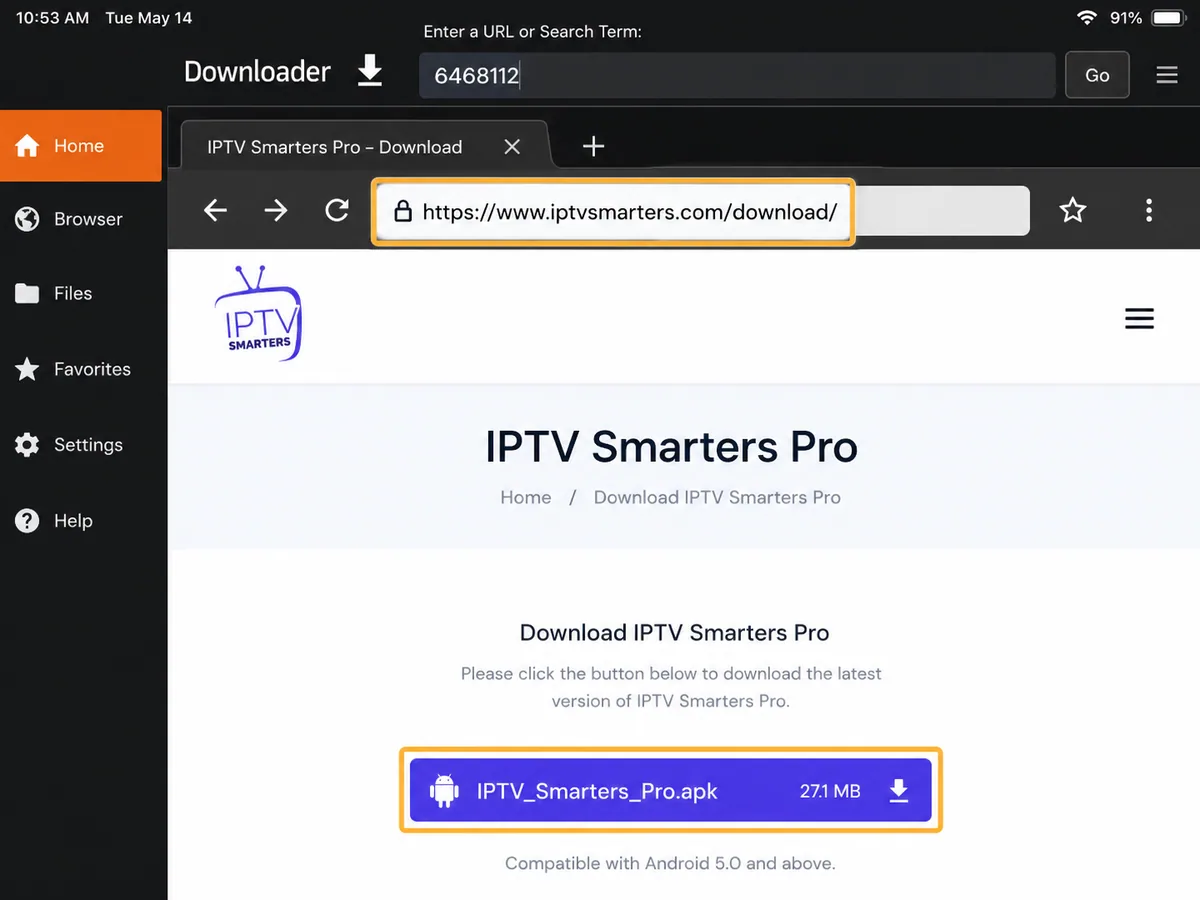
How to Use IPTV Smarters Downloader Code 6468112
Follow these steps to use code 6468112 in the Downloader app:
- Open Downloader on your Firestick.
- Select the address or code field.
- Enter 6468112.
- Select Go.
- Check the redirect page and final download address.
- Continue only if the destination shows the expected IPTV Smarters domain.
- Download the APK file.
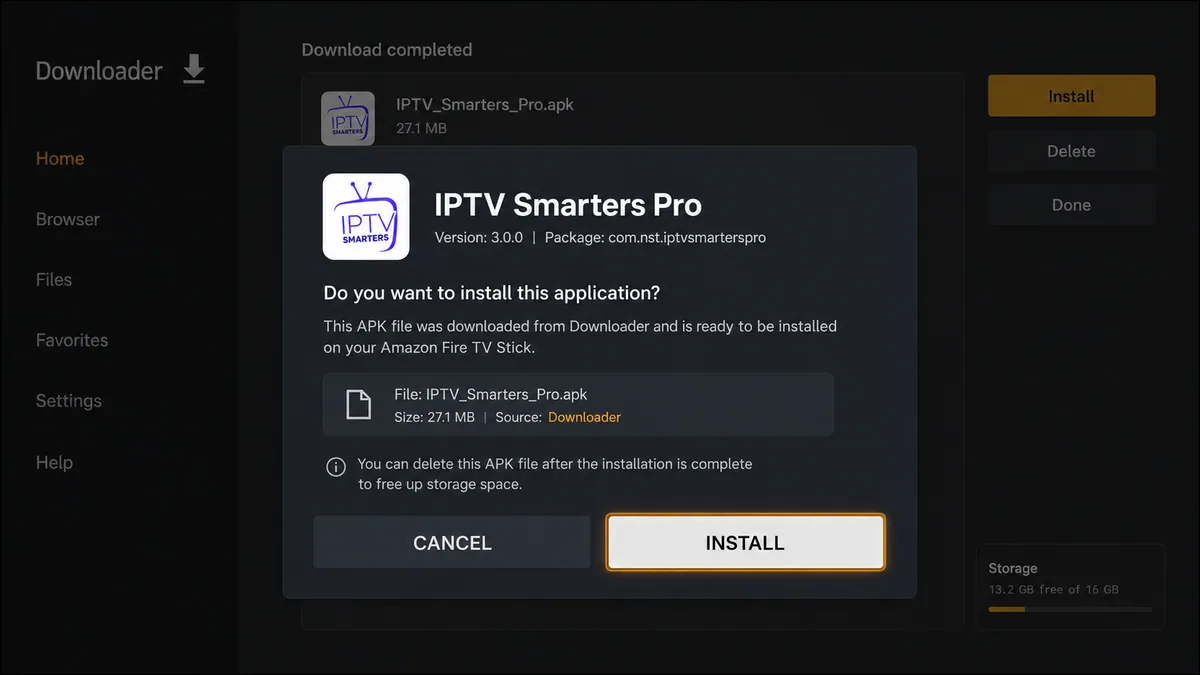
- Select Install when the Fire TV installation screen appears.
- Delete the downloaded APK after installation to free up storage.
This section focuses only on using the Downloader code. For complete instructions covering Downloader installation, Developer Options, permissions, and IPTV Smarters setup, see our complete IPTV Smarters Pro on Firestick guide.
Verify the Destination Before Installing
A Downloader code hides the full web address until you open it. For this reason, checking the final destination is an important step before installing any APK.
When code 6468112 opens, review the address shown on the redirect or download page.
The expected destination should:
- Use a secure HTTPS connection
- Show the expected IPTV Smarters domain
- Lead to an Android APK file
- Use a filename related to IPTV Smarters
- Avoid unrelated advertisements or additional app downloads
- Never ask for card or banking details simply to download the player
At the time the destination was checked, the APK filename indicated IPTV Smarters version 5.0.
Stop the installation if:
- The code opens an unrelated website
- The destination changes to an unfamiliar domain
- A ZIP, EXE, or unrelated file begins downloading
- The page asks you to install several additional applications
- Payment information is requested to download the player
- Fire TV displays an unexpected security warning
- The installed application has an unexpected name or icon
A Downloader code may be convenient, but the final web address and file details are more important when deciding whether to continue.
Downloader Code vs Direct Download Address
Both methods may lead to the same installation file, but each has different advantages.
| Method | Main Benefit | Main Limitation |
|---|---|---|
| Downloader code | Quick and easy to enter with a Firestick remote | The destination remains hidden until the code is opened |
| Full HTTPS address | Lets you check the domain before downloading | Takes longer to type with a remote |
| Official app store | Easier installation and automatic updates where supported | Availability may vary by device or region |
Use the Downloader code only after checking where it currently redirects. If the code stops working or you prefer to verify the complete domain before continuing, use a trusted direct download address instead.
Why IPTV Smarters Downloader Code 6468112 May Not Work
Downloader code 6468112 may stop working even if it worked previously. Several code-specific issues can cause this.
The Code Was Entered Incorrectly
Make sure you entered:
6468112
Do not include spaces, punctuation, letters, or additional numbers.
Downloader Cannot Connect
Close the Downloader app and open it again.
Also confirm that your IPTV Firestick has an active internet connection before entering the code again. If other apps or websites are not loading, restart the Firestick and router first.
The Short-Code Service Is Temporarily Unavailable
Downloader codes rely on an online redirect service. If that service is temporarily unavailable, the code may fail to open its destination.
Restart Downloader and try the code again later.
The Code Destination Has Changed
Downloader codes are not permanent links. Their destination can be updated, removed, or replaced over time.
If code 6468112 suddenly opens an unrelated website or unfamiliar download page, do not continue with the installation.
The APK File Is No Longer Available
Sometimes the Downloader code still works, but the APK file at the final destination has been moved or deleted.
In this situation, Downloader may display a missing-page error or failed-download message.
Use the current download location provided by the application publisher instead of searching for random replacement APK files.
Downloader Needs Updating
Open the Amazon Appstore and check whether an updated version of Downloader is available.
Install any available update, reopen the app, and try code 6468112 again.
What Does Code 6468112 Install?
At the time of verification, code 6468112 redirects to an APK whose filename identifies it as IPTV Smarters 5.0.
IPTV Smarters is a media-player application. After installation, you still need to connect your own compatible and authorised media source before content can appear.
The Downloader code does not provide:
- Free premium television channels
- Sky Sports or premium movie channels
- An IPTV subscription
- A free IPTV trial
- An M3U playlist URL
- Xtream Codes login details
- A server address
- A username
- A password
Code 6468112 is only an installation shortcut. It does not activate paid content or unlock television channels by itself.
Does the Downloader Code Activate IPTV Smarters?
No. Downloader code 6468112 only helps the Downloader app reach the IPTV Smarters installation file.
Installing the application and activating a media service are separate steps:
- The Downloader code opens the APK location.
- The APK installs the IPTV Smarters media player.
- The user opens the application.
- The user connects an authorised playlist, server, or compatible media source.
Installing IPTV Smarters does not automatically create an IPTV account, activate a subscription, or provide permission to watch paid content.
IPTV Smarters Code Verification Record
The verification record should be updated whenever code 6468112 is checked.
| Verification Date | Code | Result |
|---|---|---|
| 30 July 2026 | 6468112 | Redirected to an IPTV Smarters 5.0 APK hosted on the IPTV Smarters domain |
When updating this record, check the redirect directly rather than relying on information copied from another website.
Add a new verification entry when:
- The APK version changes
- The destination URL changes
- The code stops working
- A replacement Downloader code is introduced
- The publisher changes the official download method
Maintaining a visible verification history makes it easier for readers to see when the code was last checked and whether the download destination has changed over time.le.
Final Answer
The current IPTV Smarters Downloader Code is 6468112.
Enter the code in the Downloader app, review the redirect page, and confirm that the final destination belongs to the expected IPTV Smarters domain before downloading the APK.
Remember that code 6468112 installs the media player only. It does not include television channels, an IPTV subscription, an M3U playlist, or account login details.
For complete Firestick installation steps, login methods, playback settings, and troubleshooting advice, see our IPTV Smarters Pro on Firestick guide.
IPTV Smarters Downloader Code FAQs
What Is the Current IPTV Smarters Downloader Code?
The current code is 6468112.
It was confirmed as working when checked on 30 July 2026.
What Does IPTV Smarters Code 6468112 Open?
Code 6468112 currently opens an AFTVnews redirect that leads to an IPTV Smarters Pro 5.0 APK hosted on the IPTV Smarters domain.
Always check the final destination before downloading because short-code redirects can change.
Is the IPTV Smarters Downloader Code Permanent?
No.
Downloader codes should not be treated as permanent because their destination can be changed, removed, or replaced over time.
Does Code 6468112 Provide Free Channels?
No.
The code only helps install the IPTV Smarters media player. It does not provide:
- Free television channels
- IPTV subscriptions
- M3U playlists
- Xtream Codes credentials
- Usernames
- Passwords
You must connect your own authorised media source after installation.
Can I Enter the Code Directly on Firestick?
Yes.
Open the Downloader app, enter 6468112 in the address or code field, and select Go.
Check the final destination before installing the APK.
Can the Code Be Used on Android TV?
It may work on compatible Android TV and Google TV devices that support the Downloader app and allow APK installation.
Compatibility can vary depending on the device, operating system, and security settings.
What Should I Do If the Code Opens Another Website?
Stop the installation.
Do not download the file if code 6468112 redirects to an unexpected or unfamiliar website.
Check the latest information from the application publisher or return to a recently verified source before continuing.
Why Does Downloader Say the Code Is Invalid?
There are several possible reasons:
- The code was entered incorrectly
- The redirect service is temporarily unavailable
- The code has been removed
- The destination has changed
- Downloader is experiencing a network problem
Confirm that you entered all seven digits correctly before looking for another download method.
Is the Downloader Code the Same as an Xtream Codes Login?
No.
A Downloader code is simply a shortcut to a download or installation address.
An Xtream Codes login normally includes:
- A server address
- A username
- A password
These details are used to connect an authorised media service to a compatible IPTV player.
Do I Still Need an IPTV Smarters Account?
After installing IPTV Smarters, you still need to connect a compatible media source.
The exact information required depends on the app version and the service you are using. This may include an M3U playlist, server details, or other authorised login credentials.