IPTV Subscription for Firestick: UK Buyer’s Guide
Published · Updated
A Firestick can transform almost any television into a flexible streaming device, but choosing the right IPTV service is not always straightforward. Imagine finally sitting down to watch television after a busy day, only to encounter buffering, missing programme information, or a poorly organised channel list.
A reliable IPTV subscription for Firestick should make streaming simple, stable, and convenient. This guide explains how IPTV works on Firestick, which features are most important for UK households, and how to test a subscription before committing to a longer-term plan.
What Is an IPTV Subscription for Firestick?
IPTV delivers television content through an internet connection rather than a traditional satellite dish or aerial.
On a Firestick, three main components work together: the Fire TV device, a compatible IPTV player application, and a service provider that supplies authorised live or on-demand content.
Player, Service and Content Are Different
An IPTV player is simply the application used to display live channels, films, and other programmes. Depending on the app, it may support a provider login, an M3U playlist, or another compatible connection method. However, installing an IPTV player does not automatically provide access to premium channels or paid content.
The IPTV subscription for Firestick provides the actual streaming service. For this reason, it is important to evaluate the provider and the player separately.
A well-designed player cannot compensate for an unstable or unreliable service. Likewise, even a good IPTV provider may be frustrating to use if the player app is poorly designed, difficult to navigate, or incompatible with your Firestick.
Expert Insight: Think of the IPTV player as the television and the subscription as the broadcaster. Both are necessary, but each performs a different role.
Is IPTV Legal in the UK?
IPTV technology itself is legal in the UK. The legal issue depends on whether the service provider has permission to distribute the television channels, films, sporting events, and other content it offers.
The UK Intellectual Property Office advises consumers to be cautious of illicit IPTV devices and services that provide unauthorised access to paid or copyrighted content.
When choosing an IPTV subscription for Firestick, look for a provider that clearly explains its business identity, payment terms, customer support process, and rights to distribute the content it offers.
Avoid sellers that make unrealistic claims, such as providing access to every premium channel for an unusually low price, particularly when there is little information about the company or its terms of service.
How to Choose the Best IPTV Subscription for Firestick
The best IPTV subscription for Firestick should offer more than an impressive channel count. Reliable performance, relevant content, transparent pricing, and dependable customer support are usually more important than having hundreds of duplicate or low-quality channels.
Before purchasing a subscription, consider the following:
- Confirm that the provider supports customers in the UK.
- Review the available live TV, catch-up, and on-demand content.
- Check how many devices and simultaneous streams the plan allows.
- Read the cancellation, refund, and renewal policies carefully.
- Test the electronic programme guide (EPG), channel search, and navigation.
- Verify that the provider is authorised to distribute the content it offers.
A provider that performs well in these areas is more likely to deliver a stable and convenient Firestick streaming experience over the long term.
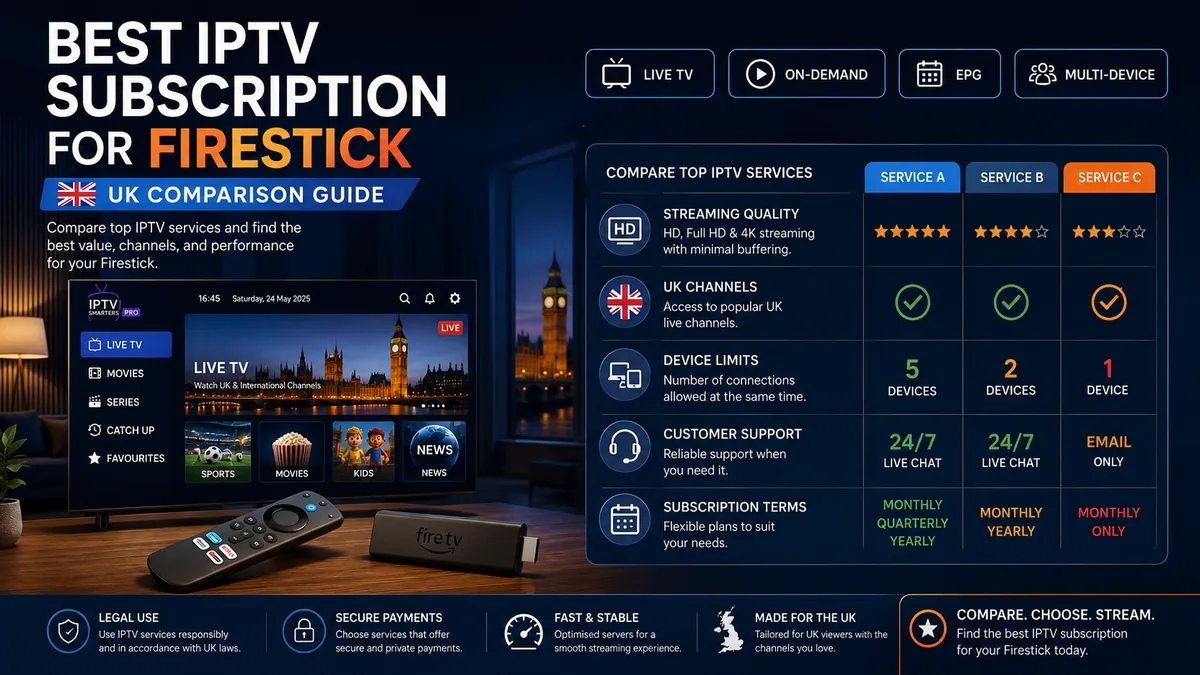
IPTV Subscription Firestick Comparison Checklist
| Feature | Why It Matters | Warning Sign |
| Trial or short plan | Lets you test the service first | Annual payment only |
| UK content | Keeps the package relevant | Huge list with poor categories |
| EPG and catch-up | Helps busy households watch later | Missing programme data |
| Device limits | Prevents login conflicts | Unclear stream policy |
| Support | Helps solve setup issues | Anonymous social account only |
| Billing | Reduces renewal surprises | “Lifetime” access claims |
Pro Tip: Test an IPTV subscription for Firestick during an evening, a weekend and a busy live event. A quiet weekday test may not reveal peak-time congestion.
Monthly or Annual Plan?
A monthly subscription usually provides greater flexibility, although the overall cost may be higher if you keep the service for a full year. An annual plan can offer better long-term value, but only after you have confirmed that the provider delivers consistent and reliable performance.
From a practical perspective, it is best to avoid committing to the longest subscription immediately. Start with a monthly or short-term plan and test the service on your own broadband connection.
During the trial period, evaluate channel quality, buffering, customer support, app compatibility, and performance during peak UK viewing hours. If the service remains reliable, you can then consider upgrading to a longer plan for better value.
Firestick, Internet and Setup Requirements
Even a reliable IPTV service can perform poorly if your Wi-Fi connection is weak or your Firestick is overloaded. Before assuming the provider is at fault, check your device model, available storage, and network performance.
Which Firestick Is Best for an IPTV Subscription for Firestick?
A current HD Fire TV Stick can perform well on a standard television. However, watching 4K content requires both a 4K-compatible Fire TV device and a television that supports 4K resolution.
Storage capacity can also influence overall performance. Amazon lists 16 GB of storage on the Fire TV Stick 4K Max, compared with 8 GB on the Fire TV Stick 4K and several other models. Additional storage can be useful if you install multiple streaming apps or need extra space for updates and temporary files.
Recommended Internet Speed
A 2026 UK Government paper notes that major UK streaming providers commonly recommend approximately 8 Mbps for HD and 25 Mbps for UHD or 4K streaming. It also states that a connection of at least 30 Mbps should generally provide reliable IPTV performance.
These figures typically apply to a single stream. Households using several televisions, video calls, online gaming, downloads, or other bandwidth-intensive services at the same time will need additional capacity.
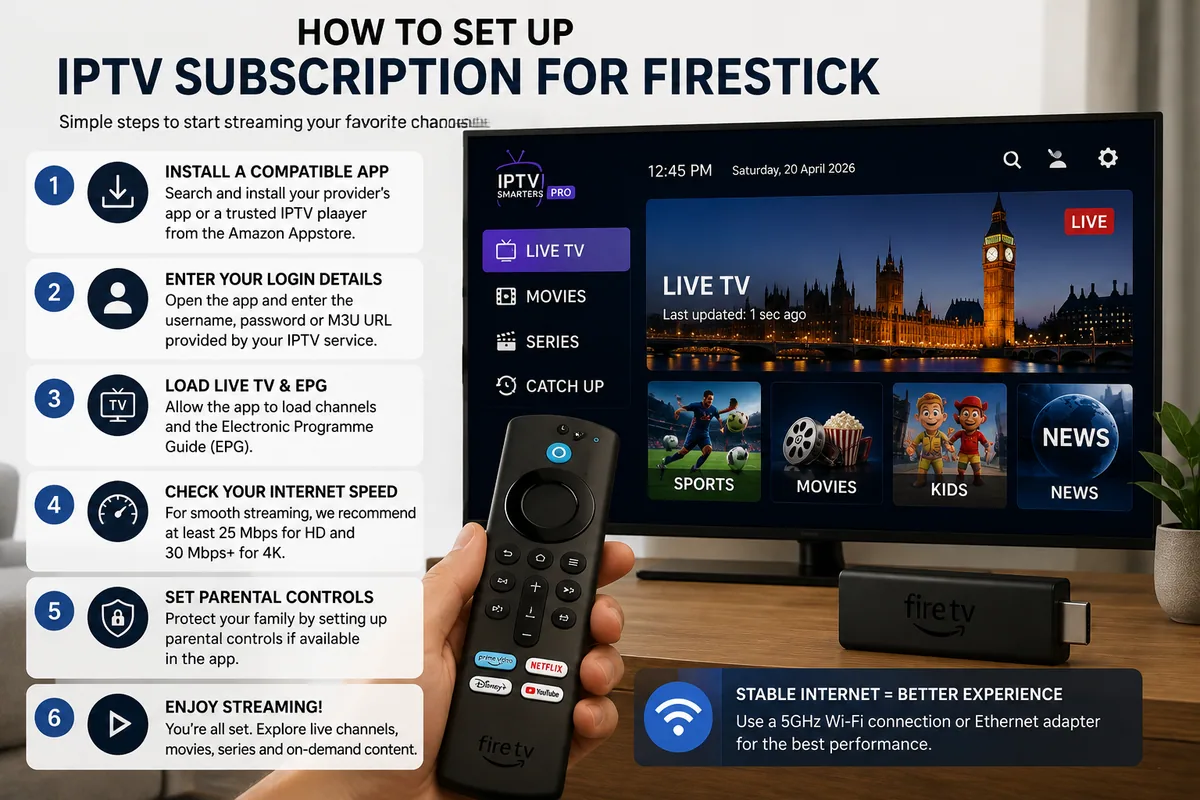
How to Set Up an IPTV Subscription for Firestick
- Create an account with a legitimate and authorised IPTV provider.
- Search the Amazon Appstore for the provider’s official app or a compatible IPTV player.
- Install the application and enter the login details supplied by the provider.
- Load the electronic programme guide and save your preferred channels.
- Configure parental controls before allowing children to use the device.
- Test both live television and on-demand content to confirm stable playback.
Whenever possible, use applications available through the official Amazon Appstore. Installing unknown APK files from unverified sources may introduce security or privacy risks. If you need to install an app from outside the store, carefully verify the publisher, download source, and requested permissions first.
Expert Insight: Run your internet speed test beside the television rather than beside the router. This provides a more accurate picture of the connection strength and speed that your Firestick actually receives.
IPTV Player for Firestick Without Subscription
You can install an IPTV player for Firestick without a subscription, but the player itself does not usually include paid television channels or premium content. Its purpose is simply to play streams or media that you are already authorised to access.
Some IPTV players are free and supported by advertising, while others require a one-time payment or premium upgrade. In either case, you will still need a legitimate provider account, an authorised playlist, or access to your own media server.
Before paying for anything, check carefully whether the price applies only to the player software or includes access to a television service as well.
Pro Tip: Choose your content provider first, then select a player that supports the provider’s login or playlist format. Starting with the player may leave you with an app that is not compatible with the service you eventually choose.
Common IPTV Firestick Subscription Problems
Even a reliable IPTV subscription for Firestick can occasionally experience technical issues. In many cases, basic troubleshooting is enough to restore normal playback.
Buffering
Restart both the router and Firestick, then test the internet speed near the television. Close any apps running in the background and, if necessary, reduce the stream quality from 4K to HD.
If other authorised streaming services are buffering as well, the problem is more likely to be related to your home network rather than the IPTV provider.
App Freezing
Clear the app cache, update Fire OS, and check how much storage is available on the device.
If the app continues to freeze or crash, reinstall the official version and sign in again using your saved account details.
Missing Programme Guide
Refresh the electronic programme guide and confirm that the Firestick is using the correct UK time zone.
If the provider offers more than one EPG source, contact customer support and ask which guide is designed to match your channel list.
Audio Out of Sync
Restart the affected stream and test a different playback decoder if the app supports this option. You can also temporarily disable surround sound to see whether the issue improves.
Audio problems may vary between channels because different streams can use different audio formats and encoding methods.
Expert Insight: Change only one setting at a time and test the result before making another adjustment. This makes it much easier to identify which change actually solved the problem..
Conclusion
A reliable IPTV subscription for Firestick should offer authorised content, consistent performance during peak viewing hours, responsive UK support, and an app that is easy for your household to use.
Start with a short-term plan, choose a stream quality that matches your broadband connection, and review device limits, programme guide quality, renewal terms, and support options before making a longer commitment.
Explore the plans available from IPTV Firestick 4K, compare the features that are most relevant to your household, and choose a setup that provides a simple, stable, and convenient viewing experience.
Frequently Asked Questions
What Is the Best IPTV Subscription for Firestick in the UK?
The best option is a licensed provider that performs reliably on your broadband connection, offers the UK content you actually watch, and provides clear billing and customer support terms.
Start with a short-term plan before committing to a longer subscription. During the trial period, compare peak-time stability, picture quality, programme guide accuracy, device limits, and cancellation policies.
Do I Need an IPTV Player and a Subscription?
In most cases, yes. The IPTV player is the application used to display live channels and on-demand content, while the subscription provides access to the actual service.
Some providers offer their own dedicated Firestick app, so a separate player may not be necessary. Always confirm the required application and login method before making a payment.
Can I Use One IPTV Subscription for Firestick on Two Devices?
This depends on the provider’s simultaneous-stream policy. Some plans allow only one active stream at a time, while family or multi-device plans may support two or more.
Being able to log in on several devices does not always mean they can stream at the same time. Check the connection limit carefully to avoid playback interruptions or account restrictions.
Why Does My IPTV Subscription for Firestick Buffer?
Buffering can be caused by weak Wi-Fi, insufficient broadband speed, limited Firestick storage, peak-time network congestion, or poor provider performance.
Test another legitimate streaming service first. If that also buffers, the issue is more likely to be related to your home network. If only one IPTV service is affected, contact the provider and test a lower stream quality.
Is a Cheap IPTV Subscription for Firestick Safe to Buy?
A low price alone does not determine whether an IPTV service is safe or legal. However, unusually large discounts, lifetime subscription claims, anonymous sellers, unclear content rights, and cryptocurrency-only payment methods can be warning signs.
Look for transparent pricing, secure payment methods, clear business information, reliable customer support, and a short trial or monthly option before making a longer commitment.
About the Author
Daniel Carter is a streaming technology specialist with more than 10 years of experience in connected TV, Fire TV devices, and digital media. He has helped UK households choose reliable streaming setups, improve Firestick performance, and resolve common playback and connectivity problems.